
- Home
- Products
- Wireless Audio Interfaces
- CellTap 4C
CellTap 4C
Wireless Phone Audio Tap- HD Voice (Wide-Band Speech)
- Switch Between Popular
TRRS Configurations - No AC or Battery Power Needed
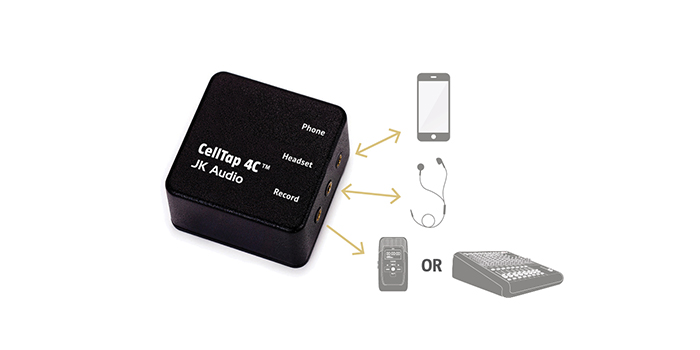
Capture Both Sides of the Conversation
CellTap 4C™ is an interview-recording adapter that connects between the headset and cell phone, providing stereo output to a recorder or mixer. CellTap 4C™ is compatible with most smart phones, tablets, and notebooks that use the 3.5 mm 4-conductor TRRS headset jack. Simply connect CellTap 4C between your existing ear-bud headset and phone, and then connect the stereo output to a mic level input on your recorder or mixer.
Product Details
| Featured Products | |
| CT | CellTap 4C |
| D2 | Daptor Two |
| D3 | Daptor Three |
| Features | CT | D2 | D3 |
| HD Voice Compatible (7 kHz Wide-Band Speech) | |||
| Bluetooth Wireless Technology | |||
| 4-conductor 3.5 mm Headset Interface | |||
| Switch Selects Between Popular TRRS Configurations | |||
| 3.5 mm Stereo Input | |||
| 3.5 mm Stereo Output | |||
| 3-pin XLR Input/Output | |||
| 1/4" Input/Output | |||
| 3.5 mm TRRS Headset Jack | |||
| Screwdriver Caller Level adjustment | |||
| Passive Design (No Battery or AC Required) | |||
| > 18 Hours on one 9-volt Alkaline Battery | |||
| Made in America | |||
| Approved for Sale in Europe and Australia |
Audio Quality
The transformer coupled stereo output provides the local mic on the left channel and the caller on the right channel. Local audio is a full bandwidth connection, meaning your voice will sound considerably better than the caller. Of course, audio quality is limited by the quality and placement of the microphone on the ear-bud style headset.
Wired Headset Required
CellTap 4C™ will not interfere with headset button controls on most devices. A headset is required for operation, as the phone will not recognize CellTap 4C without a headset connected.
TRRS Configurations
Internal switch supports both of the following wiring standards:
Specs
| Tech Reports | |
| HD Voice Primer | |
| Wireless Phone Compatibility | |
| Downloads | |
| Datasheet (128 kb) | |
| User Guide (289 kb) | |
| Specifications | |
| Record Output | 1/8" (3.5mm) Stereo |
| Impedance | 600 ohms |
| Level | 2.4 mV RMS (-50 dBu nom) |
| Misc | |
| Size | 2” x 2” x 1.3” (5.1 x 5.1 x 3.3 cm) |
| Weight | 3.5 oz |
*Wireless HD Calls: To take advantage of this extended bandwidth, both phones on the call must support HD Voice, and both phones must be on the same carrier, in coverage areas that support HD Voice.

Contact us at 1-815-786-2929
Privacy Policy